
So when it came time to throw her a baby shower in anticipation of the arrival of my soon-to-be-born niece, I thought, "how fun would it be to do a Friends theme?!" And then I (foolishly) thought, "well, it can't be that hard." Off to Pinterest I went, because surely someone else had done a baby shower with a "Friends" theme.
Nada. Couldn't find a single baby shower, but I found tons of bridal showers. So I thought, "well, guess mine will be the first." So here we go!
Nada. Couldn't find a single baby shower, but I found tons of bridal showers. So I thought, "well, guess mine will be the first." So here we go!
The basic thought was this: let's turn the room into Central Perk! Which we (kind of) did. I bought a roll of plastic brick wall sheeting from Amazon, and a roll of black sheeting from Hobby Lobby. Since we could really only decorate one wall, that's the wall we decided would be the "picture" wall. A poster of the original "Central Perk" finished off the wall. We also combed Pinterest for any screenshots of Friends with references to babies or showers, and posted those screenshots all over the place.

She had to "win" her shower in a mock-game of The Price is Right, which was a lot of fun. Maybe I'll do a post about that next. Anyways, the aforementioned black sheeting was also used to cover the doorway leading into her shower. The door itself was covered with a lilac plastic tablecloth from Hobby Lobby, and one of my bigger yellow frames which read, "The One With Suzanne's Baby Shower."

We made a "coffee spot" at the end of the wall, complete with Gunther's picture looming over it. While I would have preferred it to be bigger, it still made people smile.

The biggest problem/probably most important part was the iconic yellow frames. These were a pain in the butt, mostly because I am so not a crafty person! I tried to make the paint thicker, I tried to paint the whole thing... all turned into a mess. I finally ended up mixing Elmer's glue with the right color paint, then squirted the concoction into swirls on pre-cut yellow frames made out of yellow foam core (which my dad lovingly cut out on his scroll-saw or something like that, bless his heart. Anyways, when someone asked how I did the frames, and I explained the ridiculous process, they asked, "why didn't you just use puff paint?" PUFF PAINT!!!! It would have been soooooo much easier! So, you know, live and learn.


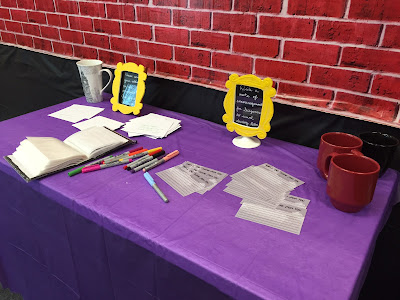
The smaller frames were used on the activity tables. I'm not a big fan of normal shower games, so we didn't do any of those. I had little notes in the frames like "write something funny on a diaper," etc. I just used double-sided tape to stick the frames to any stray 4x6 frames I had lying around (there were tons!), and that was that.


My sister (Suzanne) wanted little notes of encouragement written to her, so I grabbed a 4x6 photo album, painted it black, and then added her name above a screenshot of the "Friends" logo from the credits (note: I found it online, I did my best to respect all copyrights!). There's a "Friends" font that's really spectacular, and worked really well.


The theme of the shower was "We'll be there for you." So I used my last yellow frame and stuck it to a 16x20 canvas that I pre-painted in purple. The theme was written across, and people were asked to sign it. Whether she'll ever hang it is a mystery, but I wanted her to have a memento of her shower that was more than baby clothes/blankets. Update literally five minutes after I posted this originally: it's hanging in her nursery. Success!

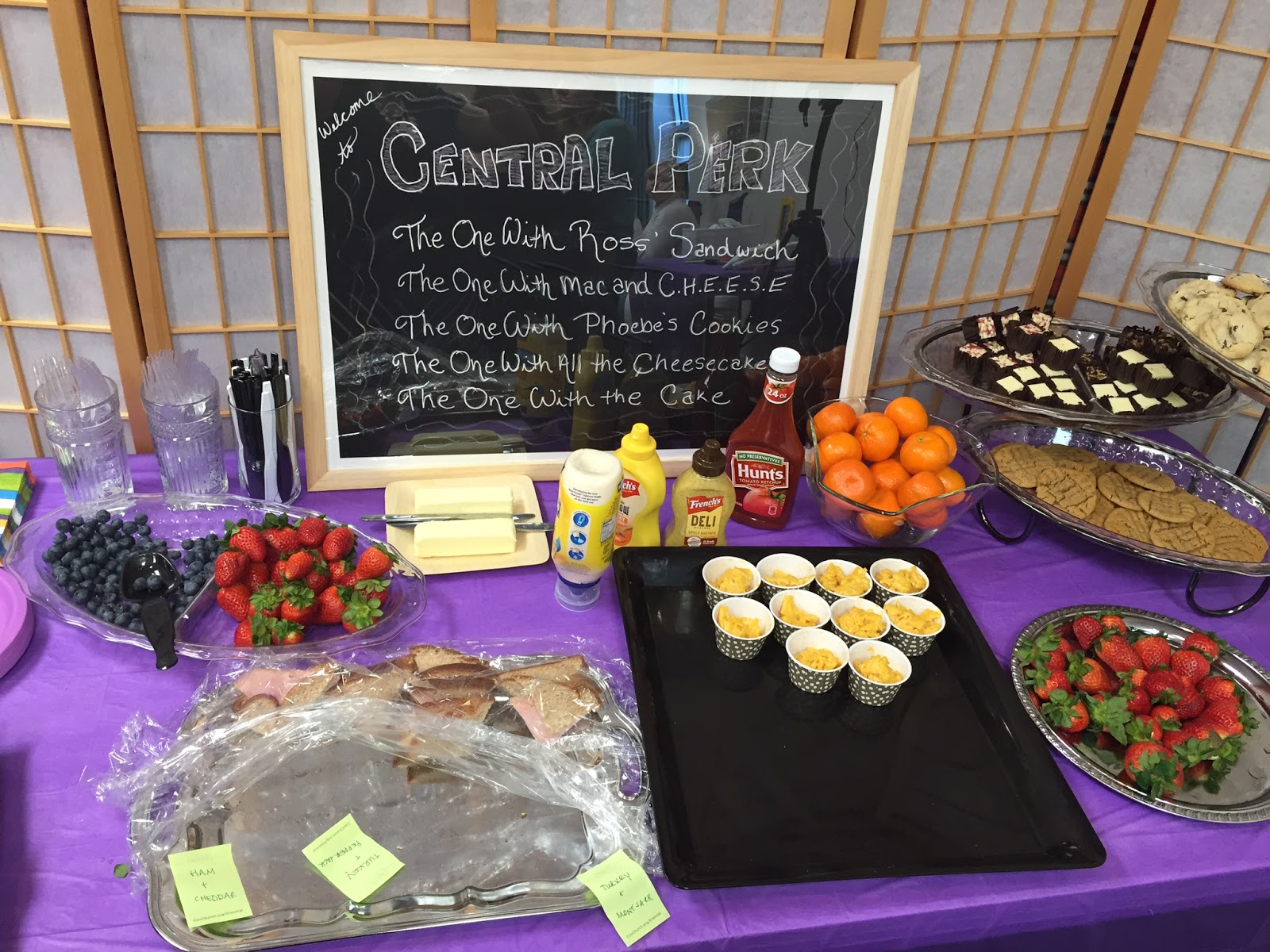
And then there was the food. Ah, the food. I was struggling with the menu until one day when I was looking at an episode list. I realized that lots of episodes are named after food! I culled them down to doable things, then wrote the episode names on a piece of chalkboard paper in chalkboard paint. It happened to be most of my sister's favorite foods as well, which was an added bonus. The cake was not my favorite, because I was working on it when I had a crazy fever/cold/plague, but it was okay and people seemed to like it.


And there you have it! Hopefully still the first Pinterest Friends baby shower. I had a ton of fun, she loved it, I'd say it was a success.
 |
| Notice the chick and the duck! |


We made a "coffee spot" at the end of the wall, complete with Gunther's picture looming over it. While I would have preferred it to be bigger, it still made people smile.

The biggest problem/probably most important part was the iconic yellow frames. These were a pain in the butt, mostly because I am so not a crafty person! I tried to make the paint thicker, I tried to paint the whole thing... all turned into a mess. I finally ended up mixing Elmer's glue with the right color paint, then squirted the concoction into swirls on pre-cut yellow frames made out of yellow foam core (which my dad lovingly cut out on his scroll-saw or something like that, bless his heart. Anyways, when someone asked how I did the frames, and I explained the ridiculous process, they asked, "why didn't you just use puff paint?" PUFF PAINT!!!! It would have been soooooo much easier! So, you know, live and learn.


The smaller frames were used on the activity tables. I'm not a big fan of normal shower games, so we didn't do any of those. I had little notes in the frames like "write something funny on a diaper," etc. I just used double-sided tape to stick the frames to any stray 4x6 frames I had lying around (there were tons!), and that was that.


My sister (Suzanne) wanted little notes of encouragement written to her, so I grabbed a 4x6 photo album, painted it black, and then added her name above a screenshot of the "Friends" logo from the credits (note: I found it online, I did my best to respect all copyrights!). There's a "Friends" font that's really spectacular, and worked really well.


The theme of the shower was "We'll be there for you." So I used my last yellow frame and stuck it to a 16x20 canvas that I pre-painted in purple. The theme was written across, and people were asked to sign it. Whether she'll ever hang it is a mystery, but I wanted her to have a memento of her shower that was more than baby clothes/blankets. Update literally five minutes after I posted this originally: it's hanging in her nursery. Success!

And then there was the food. Ah, the food. I was struggling with the menu until one day when I was looking at an episode list. I realized that lots of episodes are named after food! I culled them down to doable things, then wrote the episode names on a piece of chalkboard paper in chalkboard paint. It happened to be most of my sister's favorite foods as well, which was an added bonus. The cake was not my favorite, because I was working on it when I had a crazy fever/cold/plague, but it was okay and people seemed to like it.


And there you have it! Hopefully still the first Pinterest Friends baby shower. I had a ton of fun, she loved it, I'd say it was a success.


